AWS Infrastructure Security Best Practices: Building a Secure Foundation
A quick look at simple AWS infrastructure practices that help reduce exposure and keep cloud systems better protected.
A quick look at simple AWS infrastructure practices that help reduce exposure and keep cloud systems better protected.
Introduction
An AWS environment can look fine from the outside. No obvious errors. No major alerts. Everything seems to be running.
But sometimes the risk is in the setup itself.
A server may be public when it should be private. A database may be reachable from places it should not be. Systems may be allowed to talk to each other more than they really need to.
Most of the time, it is not a complex attack that creates the first problem. It is a small infrastructure gap that was missed or left open for too long.
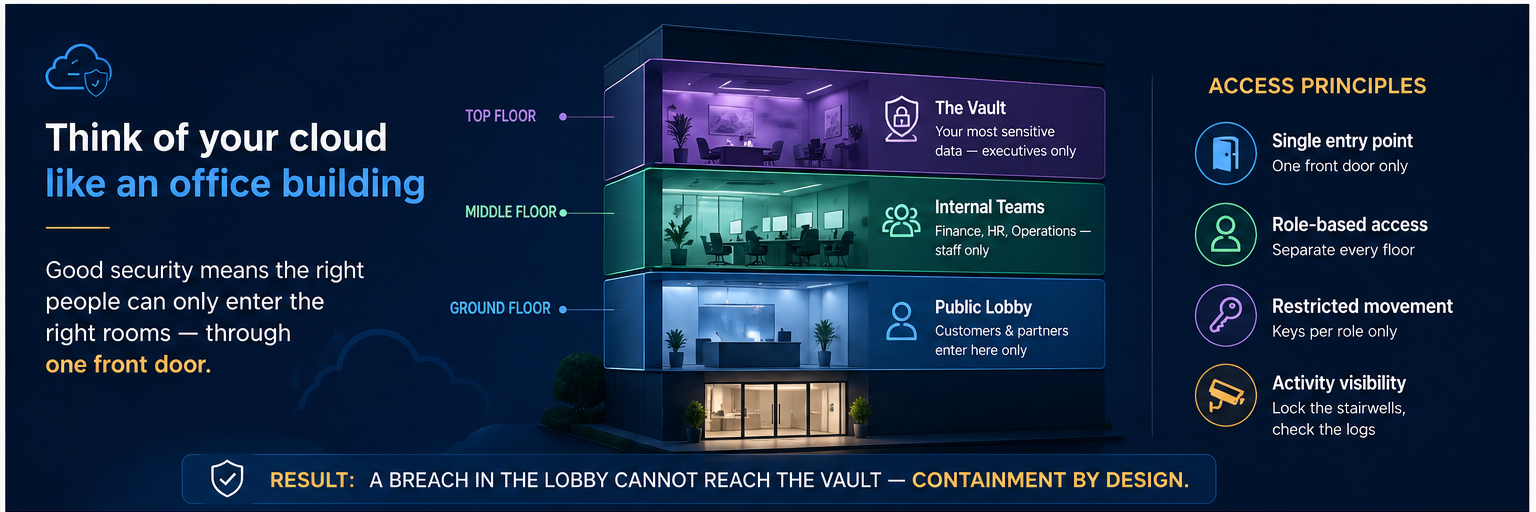
The diagram below shows the basic idea: keep public-facing traffic controlled, separate internal layers, and avoid exposing systems directly when they do not need to be public.
Key Best Practices
A safer AWS setup usually starts with a few simple checks.
1. Limit what is exposed
Only expose what really needs to be accessed from the internet.
Public-facing services may need to be reachable, but internal systems, databases, and backend services should usually stay private.
The goal is simple: keep private systems private.
2. Separate your systems clearly
Do not place everything in one flat environment.
Public-facing components, application services, and data storage should be separated. This makes it easier to control access and reduce the impact if one part of the system has an issue.
A simple setup may look like this:
- public layer for internet-facing traffic
- application layer for backend services
- data layer for databases and storage
This makes the environment easier to review and safer to manage.
3. Control how systems interact
Only let systems talk when they have to.
For example, if an application server only needs traffic from a load balancer, it should not be open to the whole internet.
Security groups can help control which systems can connect, what ports are allowed, and where traffic can come from.
4. Use a controlled entry point
External traffic should go through a managed entry point, such as a load balancer.
This is better than exposing multiple servers or services directly.
It also makes routing, monitoring, and access control easier to manage.
5. Review exposure regularly
AWS environments change over time, so exposure should be reviewed regularly.
New services are added. Security groups are updated. Temporary access is opened and sometimes forgotten.
That is why it is important to regularly check:
- what is public
- what ports are open
- which systems can talk to each other
- whether internal services are still private
Small gaps are easier to fix early.
Why This Matters
Security does not usually fail because of one big mistake.
It often fails because of small changes that were never reviewed again. A temporary rule stays open. A test server becomes permanent. A security group is updated for convenience and never tightened back.
Over time, these small gaps can create real exposure.
That is why infrastructure security is not only about setting things up correctly once. It is also about checking whether the environment still matches how it was meant to work.
30-Second Audit
Before adding more tools, start with the basics:
- The Public Test: Is this resource supposed to be public?
- The Access Test: Should these systems be allowed to communicate?
- The Entry Point Test: Is traffic entering through a controlled path?
- The Layering Test: Are public, application, and data layers separated?
- The Visibility Test: Do we know what is currently exposed?
If the answer is unclear, that is where the review should start.
Conclusion
AWS infrastructure security starts with reducing what is exposed and controlling how systems connect.
The basics matter: keep internal systems private, separate your layers, and make sure access is intentional.
These simple decisions can make the environment much easier to manage and much safer over time.
Next Step
We have seen how quickly a temporary setup can become permanent.
If your AWS security groups, public resources, or network access have not been reviewed in a while, it may be time for a quick check.
Book a quick review with Skybit and we’ll help you spot what may be exposed, too open, or worth tightening.
support@skybit.cloud
skybit.cloud
Skybit Tech Bytes: The AWS Security Series
- Building a Secure Foundation (Reading Now)
- Managing the Front Door
- Who holds the keys? (IAM)
..png)